Wednesday, April 24, 2013

TFS 2012 Web Access Can’t load your extension


In Team Foundation Server 2012 you can develop extensions to the web interface, there extensions are javascripts (JQuery) that can be easily installed from the TFS Web Access Control Panel.
For information about the scripts and how to make a package and manifest se Serkan's Blog
After creating a package and trying to run my scripts I go a error message:

Module ‘mymodule’ cannot be loaded. This may be due to lost connectivity or an incomplete or corrupted download of the file. Try refreshing your browser or clearing your browser cache to retrieve the file again.

By turning on Web Access Script Debug Mode I found that a script called mymodule.debug.js is mandatory by using Fiddler (Be sure to include a .debug script if you plan to ship your extension or your extension will fail if debug is turned on)

OK so the .debug file was missing, adding that file (An empty one in my case solved the problem) – So the message was telling the truth… the file is not found

So I turned off Web Access Script Debug Mode and looked at Fiddler again, OK here is the solution: My script file was not minified and not called .min.js hence the file was not found.

By renaming the .js file to .min.js the file was loaded and all works as expected.

TFS Web Access expects the extension script to be named your.module.min.js regardless of what files that are in your zipped package.

Thursday, May 31, 2012

Make dOOdads understand SQL Datatype Date


For you that are using the  dOOdads .NET architecture and are generating source based on tables that use the datatypes Date or Time and are getting Unknown in your code. Here is a simple solution to make MyGeneration create code that supports SQL data types Date and Time:

Locate your DbTargets.xml and add

<Type From="date" To="SqlDbType.Date" />
<Type From="time" To="SqlDbType.Time" />
 
Locate your Languages.xml and add

<Type From="date" To="DateTime" />
<Type From="time" To="TimeSpan" />
 
The dOOdads allready known the datatype TimeSpan so the rest is handlesd by the framework.
To add a Date in code use DateTime.TimeOfDay to get the TimeSpan

Wednesday, February 15, 2012

Error when adding a Record Center site

When adding a Record Center to a SharePoint Server installation you may see the error “Dependency feature ‘DocumentRoutingResources’ … is not Activated

DocumentRoutingResources_Error

The feature is a hidden feature and can not be enabled in the GUI’s

To enable this feature start the “SharePoint 2010 Management Shell” (Power Shell) located in the start menu in “Microsoft SharePoint 2010” folder.

Copy/type the following command to enable:

Enable-SPFeature -Identity "DocumentRoutingResources" -Url http://yoursiteurl


RecordsCenter

Thursday, May 26, 2011

Create a TFS Field that contains Assigned Date

The default TFS workitems does not have a field that records last “Assigned To” date. You can easily create a new field to record this date

Start by creating a new Field Definition

AssignedToDateField_Create

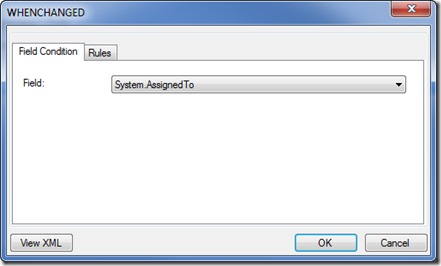
Create a new rule of type WHENCHANGED

SNAGHTML8f39e02

Select Field System.AssignedTo

WhenChanged

Create a new rule of type SERVERDEFAULT

SNAGHTML8f5a976

Select from “clock”

SNAGHTML8f63fbc

The field Assigned Date is now created and will be updated when the workitem is assigned or re-assigned.

If you prefer to modify the XML directly here is the snippet:

 <FIELD name="Assigned Date" refname="NTS.AssignedDate" type="DateTime" reportable="dimension">
        <WHENCHANGED field="System.AssignedTo">
          <SERVERDEFAULT from="clock" />
        </WHENCHANGED>
      </FIELD
>

Tuesday, May 10, 2011

Workflow - Use url when creating a link in workflow steps

This may be obvious, but if you choose text instead of url in a link that you create in SharePoint Designer you can get an invalid link since the text version also includes the title

Ex: “http://mysite.mydom.com, Link Title”

In my case a link already existed in a SharePoint ListItem as a valid URL. But when added as a link in a mail the url got the trailing comma and title. Which in turn gave the webserver an invalid parameter.

The link that should have been:

…/wi.aspx?pcguid=d6d9eacb-0d67-4b19-ad62-626ab5cc1cf0&id=916

became

…/wi.aspx?pcguid=d6d9eacb-0d67-4b19-ad62-626ab5cc1cf0&id=916,%20Click%20to%20open%20the%20WorkItem%20in%20TFS

and the TFS Web did not like ID’s with comma and text…

Url

Friday, May 6, 2011

Remember to modify default.aspx after enabling “Wiki Page Home Page”

When enabling this feature you are modifying the default homepage of your site. The homepage will go from …/Default.aspx to …/SitePages/Home.aspx

When users have added bookmarks using the default.aspx homepage the users will still use your old homepage.

Quickfix edit the default.aspx file using SharePoint Designer and make a redirect to the new page. Or just add a Content editor and insert a script or descriptive text to update bookmarks

Monday, April 18, 2011

Unable to restore Oracle VirtualBox virtual machine

Note: The same issue also occurs when VirtualBox is upgraded to version 4.0.6 r71416. when you try to start any virtual machine

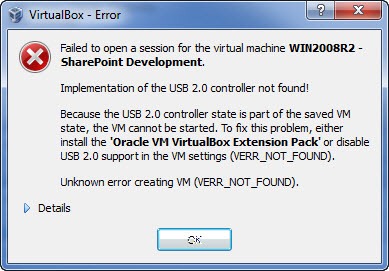
Failed to open a session for the virtual machine <your machine> Implementation of the USB 2.0 controller not found!
Because the USB 2.0 controller state is part of the saved VM state, the VM cannot be started. To fix this problem, either install the 'Oracle VM VirtualBox Extension Pack' or disable USB 2.0 support in the VM settings (VERR_NOT_FOUND).
Unknown error creating VM (VERR_NOT_FOUND).

Today this message appeared when resuming the development machine.. Oracle VirtualBox v4.04

VirtualBox_Error

Especially interesting because the server was paused during a windows update (Not normally something that I do, but my host ran out of resources)

This is a verified bug, and can be easily fixed!

Locate your machine xml files (In windows they are stored in C:\Users\<your username>\.VirtualBox\Machines\<your machine>

STOP VirtualBox Manager

Open the file and locate the line:

 <USBController enabled="true" enabledEhci="false"/>


Set enabledEhci to false


Start VirtualBox Manager, and resume the virtual machine.


VirtualBox_Error_Fixed


See VirtualBox.org for more information (Ticket #8182)